---
title: Contributing
order: 8
---
# Contributing to React Router
Thanks for contributing, you rock!
When it comes to open source, there are many different kinds of contributions that can be made, all of which are valuable. Here are a few guidelines that should help you as you prepare your contribution.
## Setup
Before you can contribute to the codebase, you will need to fork the repo. This will look a bit different depending on what type of contribution you are making:
- All new features, bug-fixes, or **anything that touches `react-router` code** should be branched off of and merged into the `dev` branch
- Changes that only touch documentation can be branched off of and merged into the `main` branch
The following steps will get you set up to contribute changes to this repo:
1. Fork the repo (click the Fork button at the top right of [this page](https://github.com/remix-run/react-router))
2. Clone your fork locally
```bash
# in a terminal, cd to parent directory where you want your clone to be, then
git clone https://github.com//react-router.git
cd react-router
# if you are making *any* code changes, make sure to checkout the dev branch
git checkout dev
```
3. Install dependencies and build. React Router uses [pnpm](https://pnpm.io), so you should too. If you install using `npm`, unnecessary `package-lock.json` files will be generated.
## Think You Found a Bug?
Please conform to the issue template and provide a clear path to reproduction with a code example. Best is a pull request with a failing test. Next best is a link to CodeSandbox or repository that illustrates the bug.
## Adding an Example?
Examples can be added directly to the main branch. Create a branch off of your local clone of main. Once you've finished, create a pull request and outline your example.
## Proposing New or Changed API?
Please provide thoughtful comments and some sample code that show what you'd like to do with React Router in your app. It helps the conversation if you can show us how you're limited by the current API first before jumping to a conclusion about what needs to be changed and/or added.
We have learned by experience that small APIs are usually better, so we may be a little reluctant to add something new unless there's an obvious limitation with the current API. That being said, we are always anxious to hear about cases that we just haven't considered before, so please don't be shy! :)
## Issue Not Getting Attention?
If you need a bug fixed and nobody is fixing it, your best bet is to provide a fix for it and make a [pull request](https://help.github.com/en/github/collaborating-with-issues-and-pull-requests/creating-a-pull-request). Open source code belongs to all of us, and it's all of our responsibility to push it forward.
## Making a Pull Request?
Pull requests need only the approval of two or more collaborators to be merged; when the PR author is a collaborator, that counts as one.
When creating the PR in GitHub, make sure that you set the base to the correct branch. If you are submitting a PR that touches any code, this should be the `dev` branch. You set the base in GitHub when authoring the PR with the dropdown below the "Compare changes" heading: 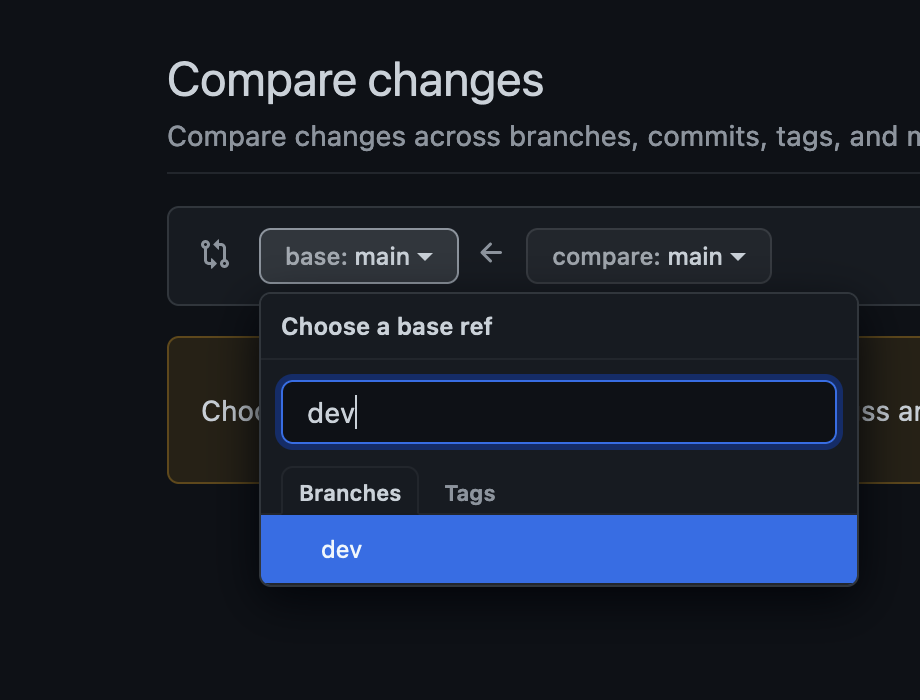 ### Tests
All commits that fix bugs or add features need a test.
``
### Change Files
In order to facilitate release notes generation, every PR with a user-facing impact should include one or more change files. You can generate these vis `pnpm run changes:add` (requires node 24+).
This tool will generate change files in the relevant `packages//.changes/` directories. Change files are markdown files with a short description of the change. They should be named using the format `..md` where type is either `patch`, `minor`, `major`, or `unstable`. For example:
```sh
patch.fix-fetcher-redirects.md
minor.add-some-new-api.md
major.require-node-24.md
unstable.update-unstable-api.md
```
### Docs + Examples
All commits that change or add to the API must be done in a pull request that also updates all relevant examples and docs.
## Development
### Packages
React Router uses a monorepo to host code for multiple packages. These packages live in the `packages` directory.
We use [pnpm workspaces](https://pnpm.io/workspaces/) to manage installation of dependencies and running various scripts. To get everything installed, make sure you have [pnpm installed](https://pnpm.io/installation), and then run `pnpm install` from the repo root.
### Building
Calling `pnpm build` from the root directory will run the build, which should take only a few seconds. It's important to build all the packages together because `react-router-dom` and `react-router-native` both use `react-router` as a dependency.
### Testing
Before running the tests, you need to run a build. After you build, running `pnpm test` from the root directory will run **every** package's tests. If you want to run tests for a specific package, use `pnpm test --projects packages/`:
```bash
# Test all packages
pnpm test
# Test only react-router-dom
pnpm test --projects packages/react-router-dom
```
## Repository Branching
This repo maintains separate branches for different purposes. They will look something like this:
```
- main > the most recent release and current docs
- dev > code under active development between stable releases
- v5 > the most recent code for a specific major release
```
There may be other branches for various features and experimentation, but all of the magic happens from these branches.
## New Releases
When it's time to cut a new release, we follow a process based on our branching strategy depending on the type of release.
### `react-router@next` Releases
We create experimental releases from the current state of the `dev` branch. They can be installed by using the `@next` tag:
```bash
pnpm add react-router-dom@next
# or
npm install react-router-dom@next
```
These releases will be automated as PRs are merged into the `dev` branch.
### Latest Major Releases
```bash
# Start from the dev branch.
git checkout dev
# Merge the main branch into dev to ensure that any hotfixes and
# docs updates are available in the release.
git merge main
# Create a new release branch from dev.
git checkout -b release/v6.1.0
# Create a new tag and update version references throughout the
# codebase.
pnpm run version minor # | "patch" | "major"
# Push the release branch along with the new release tag.
git push origin release/v6.1.0 --follow-tags
# Wait for GitHub actions to run all tests. If the tests pass, the
# release is ready to go! Merge the release branch into main and dev.
git checkout main
git merge release/v6.1.0
git checkout dev
git merge release/v6.1.0
# The release branch can now be deleted.
git branch -D release/v6.1.0
git push origin --delete release/v6.1.0
# Now go to GitHub and create the release from the new tag. Let
# GitHub Actions take care of the rest!
```
### Hot-fix Releases
Sometimes we have a crucial bug that needs to be patched right away. If the bug affects the latest release, we can create a new version directly from `main` (or the relevant major release branch where the bug exists):
```bash
# From the main branch, make sure to run the build and all tests
# before creating a new release.
pnpm install && pnpm build && pnpm test
# Assuming the tests pass, create the release tag and update
# version references throughout the codebase.
pnpm run version patch
# Push changes along with the new release tag.
git push origin main --follow-tags
# In GitHub, create the release from the new tag and it will be
# published via GitHub actions
# When the hot-fix is done, merge the changes into dev and clean
# up conflicts as needed.
git checkout dev
git merge main
git push origin dev
```
### Tests
All commits that fix bugs or add features need a test.
``
### Change Files
In order to facilitate release notes generation, every PR with a user-facing impact should include one or more change files. You can generate these vis `pnpm run changes:add` (requires node 24+).
This tool will generate change files in the relevant `packages//.changes/` directories. Change files are markdown files with a short description of the change. They should be named using the format `..md` where type is either `patch`, `minor`, `major`, or `unstable`. For example:
```sh
patch.fix-fetcher-redirects.md
minor.add-some-new-api.md
major.require-node-24.md
unstable.update-unstable-api.md
```
### Docs + Examples
All commits that change or add to the API must be done in a pull request that also updates all relevant examples and docs.
## Development
### Packages
React Router uses a monorepo to host code for multiple packages. These packages live in the `packages` directory.
We use [pnpm workspaces](https://pnpm.io/workspaces/) to manage installation of dependencies and running various scripts. To get everything installed, make sure you have [pnpm installed](https://pnpm.io/installation), and then run `pnpm install` from the repo root.
### Building
Calling `pnpm build` from the root directory will run the build, which should take only a few seconds. It's important to build all the packages together because `react-router-dom` and `react-router-native` both use `react-router` as a dependency.
### Testing
Before running the tests, you need to run a build. After you build, running `pnpm test` from the root directory will run **every** package's tests. If you want to run tests for a specific package, use `pnpm test --projects packages/`:
```bash
# Test all packages
pnpm test
# Test only react-router-dom
pnpm test --projects packages/react-router-dom
```
## Repository Branching
This repo maintains separate branches for different purposes. They will look something like this:
```
- main > the most recent release and current docs
- dev > code under active development between stable releases
- v5 > the most recent code for a specific major release
```
There may be other branches for various features and experimentation, but all of the magic happens from these branches.
## New Releases
When it's time to cut a new release, we follow a process based on our branching strategy depending on the type of release.
### `react-router@next` Releases
We create experimental releases from the current state of the `dev` branch. They can be installed by using the `@next` tag:
```bash
pnpm add react-router-dom@next
# or
npm install react-router-dom@next
```
These releases will be automated as PRs are merged into the `dev` branch.
### Latest Major Releases
```bash
# Start from the dev branch.
git checkout dev
# Merge the main branch into dev to ensure that any hotfixes and
# docs updates are available in the release.
git merge main
# Create a new release branch from dev.
git checkout -b release/v6.1.0
# Create a new tag and update version references throughout the
# codebase.
pnpm run version minor # | "patch" | "major"
# Push the release branch along with the new release tag.
git push origin release/v6.1.0 --follow-tags
# Wait for GitHub actions to run all tests. If the tests pass, the
# release is ready to go! Merge the release branch into main and dev.
git checkout main
git merge release/v6.1.0
git checkout dev
git merge release/v6.1.0
# The release branch can now be deleted.
git branch -D release/v6.1.0
git push origin --delete release/v6.1.0
# Now go to GitHub and create the release from the new tag. Let
# GitHub Actions take care of the rest!
```
### Hot-fix Releases
Sometimes we have a crucial bug that needs to be patched right away. If the bug affects the latest release, we can create a new version directly from `main` (or the relevant major release branch where the bug exists):
```bash
# From the main branch, make sure to run the build and all tests
# before creating a new release.
pnpm install && pnpm build && pnpm test
# Assuming the tests pass, create the release tag and update
# version references throughout the codebase.
pnpm run version patch
# Push changes along with the new release tag.
git push origin main --follow-tags
# In GitHub, create the release from the new tag and it will be
# published via GitHub actions
# When the hot-fix is done, merge the changes into dev and clean
# up conflicts as needed.
git checkout dev
git merge main
git push origin dev
```